



Planning a Website
Real Estate Website: Keeping 3D Visualization and Target Groups Cleanly Separated


Key takeaways
- A project website with 3D pays off for new-build projects that are sold off plan, because it connects visualizations with availability, floor plans and inquiry, which a PDF cannot do
- The PDF stays useful as a download, the website does not replace it but bundles the same renderings for several target groups
- According to Google, good values are LCP up to 2.5 s, INP up to 200 ms and CLS up to 0.1 at the 75th percentile, so heavy 3D scenes do not belong in the first view
- In a developer contract (Bauträgervertrag), the building specification does not automatically become part of the contract, so visualizations must be labeled as such and kept apart from the contractual scope of work
- Owners and property seekers need separate entry points, forms and tone, because 71% of surveyed brokers focus their advice on owners, while 53% want to support buyers better
Short answer: A project website with 3D visualizations is worth it for new-build projects that are sold before construction starts, because it brings images, availability, floor plans and inquiry together in one place. A brochure PDF cannot do that. The PDF still makes sense as a download. Two things matter: the 3D content must not wreck your load time, and owners and prospective buyers need separate paths through the site.
Key points
- 3D pays off when it shows something photos cannot: a building that does not exist yet, variants, lighting moods, location within the neighborhood.
- Website and PDF complement each other. The website is the showcase and the inquiry path, the PDF is the document for the decision maker.
- Technically, a pre-rendered sequence or a video is usually a better choice than real-time 3D in the browser.
- Visualizations must be recognizable as such. In a developer contract, what counts is what is in the building specification and the notarized contract, not the image.
- Owners (marketing offer) and property seekers (available properties) need separate entry points.
Contents
- PDF or website: what can each do?
- When 3D pays off and when it does not
- Which 3D formats exist
- Load time: the budget for 3D
- What 3D costs: market ranges
- Labeling and building specification
- Two target groups, two paths
- How to separate the user paths
- Accessibility and motion
- Checklist
- Common mistakes
- When you do not need an agency
- How we implement this
- Frequently asked questions
PDF or website: what can each do?
The brochure PDF is the standard format of real estate marketing, and for good reason: it is portable, can be forwarded, printed and archived, and fits into the processes of banks, notaries and investors. A project website does other things better.
| Criterion | Brochure PDF | Project website |
|---|---|---|
| Timeliness | Static, every change means a new file | Availability, prices and construction progress can be updated |
| Motion and interaction | None | Scroll sequences, videos, floor plan switching, site plan |
| Inquiry | Has to be stated separately | Form, callback, appointment directly on the property |
| Measurability | Download count, if at all | Page views, inquiries per unit, sources |
| Findability | Low, search engines index PDFs less well than pages | Own URLs for project, units and location |
| Sharing | Very easy | Link, but less archivable without a PDF download |
| Reliability of the information | Status as of the sending date, traceable | Must stay traceable through version and date |
| Effort | Design once, recreate when things change | Setup and maintenance, but reusable many times |
The last point is easy to overlook and important: a PDF is a document with a fixed date. On a website you change something, and the previous version is gone. If you change prices or areas, log that internally. This is a recommendation from practice, not a legal requirement.
The sensible solution for most projects is both: the website tells the story of the project and leads to the inquiry, and a PDF brochure is available as a download, optionally after a form. How the download is implemented in the CMS is covered in the article Property pages and property search in the Webflow CMS.
When 3D pays off and when it does not
3D visualizations are an obvious choice for new-build projects, because the property does not exist yet. A provider of architectural visualization lists these advantages: selling before construction starts, a more emotional purchase decision, using the same renderings multiple times in the brochure, portal, social media and investor presentation, and lower costs than a furnished show apartment (Maverickframe, blog on 3D visualization in real estate marketing). That is the view of a provider with no study behind it, but it matches practice.
The provider's logic alone does not mean a project website is worth it. The decision depends on a few questions:
| Question | If yes | If no |
|---|---|---|
| Is the project marketed before construction starts or during the construction phase? | 3D carries a lot of weight | Photos are enough once it is finished |
| Do you have many units with different floor plans? | A website with a unit overview pays off | A project page with images is enough |
| Are the renderings being commissioned anyway? | The extra cost for the website is small | The renderings are the biggest cost block |
| Do you want to address several target groups (owners, buyers, investors)? | A website can separate the paths | A targeted PDF is enough |
| Do you have capacity to maintain status, prices and construction progress? | The website stays current | An outdated page does more harm than a PDF |
| Is the project small, or an existing property with many photos? | Photos and video are the first choice |
For existing properties without renovation, photography remains the first choice according to the cited provider. There, 3D is decoration, not information.
Which 3D formats exist
"3D on the website" can mean different things. The differences decide effort, load time and impact.
| Format | What visitors see | Strength | Limit |
|---|---|---|---|
| Still renderings | Photorealistic images of exteriors and interiors | Simple, fast, usable in all channels | No interaction |
| Image sequence on scroll | A camera move that follows the scrolling | Cinematic impression without the browser having to compute anything | File size due to many frames |
| Video | A flyover or interior view that simply plays | Easy to embed, predictable | Large files, autoplay rules on mobile devices |
| Interactive walkthrough | Visitors move around on their own | Strong impression | High production effort, maintenance when things change |
| Real-time 3D in the browser | A rotatable model | Maximum freedom | Highest effort, load on mobile devices |
For real estate project websites, the combination of still images, a sequence or short video as the intro, and a floor plan module is enough in most cases. Real-time 3D only pays off when visitors really need to explore a building or an apartment freely. The technical side, including scroll scene technology and reduced motion, is covered on the page 3D and scroll animations in Webflow. The comparison of interactive and rendered presentation is in the guide 3D configurator or 3D rendering, even though it was written for products.
Load time: the budget for 3D
The more motion and image material, the greater the risk of a slow page. Google gives these targets for the Core Web Vitals, measured at the 75th percentile of page views: largest contentful paint (LCP) within 2.5 seconds, interaction to next paint (INP) of at most 200 milliseconds, and cumulative layout shift (CLS) of at most 0.1 (web.dev, Web Vitals).
A 3D render or video in the first view is usually the largest element itself and therefore the LCP. So the rules are:
- Keep the first image small and static. A compressed rendering loads instantly. The motion comes afterward.
- Lazy-load heavy media. Start sequences and videos only when the page has settled or the visitor scrolls to them.
- Handle mobile differently. On the smartphone, use a still image or a short, lean variant instead of the full scene.
- Measure instead of guess. Check PageSpeed Insights and real user data, not just the impression on the fast office computer.
Motion and speed are not mutually exclusive. How a scroll animation comes together step by step is shown in the guide Scroll animation in Webflow.
What 3D costs: market ranges
There are hardly any reliable market prices for architectural visualization, because level of detail, number of views, furnishing and speed determine the price. The visualization provider cited above gives a range in the three- to four-digit euro range for a single photorealistic image. Animations and virtual walkthroughs cost more (Maverickframe). That is one provider's statement, not a market average.
The website adds development effort on top. A motion design provider states on its own service page ranges for website projects with motion of €8,000 to €15,000 (business website) and €15,000 to €30,000 (premium website), with individual animations and 3D models priced by scope (in-sync, motion design agency). This too is the statement of a single provider. The biggest cost lever is usually not the website but whether the renderings are being created anyway. If they are, the additional investment for the website is manageable, because you use the same material several times.
Labeling and building specification
Visualizations show a planned state. That has legal consequences you should not skip over. This page does not replace legal advice. It collects what you should clarify with a lawyer.
Labeling. Visualizations should be recognizable as such, for example with the note "Visualization, deviations in execution and fittings possible". Furnishings, materials and surroundings (trees, neighboring buildings) can be flattering in a rendering. The cited provider also recommends labeling and transparency about deviations.
Building specification. In a consumer construction contract (Verbraucherbauvertrag), the contractor must give the consumer a building specification in text form in good time before the contract declaration (§ 650j BGB in conjunction with Art. 249 EGBGB). Its details on the construction work generally become part of the contract (§ 650k BGB). In a developer contract (Bauträgervertrag), which is notarized, the building specification does not automatically become part of the contract: all items must be listed individually in the notarized contract (VPB guide on the building specification, § 650j BGB). The guide does not say how brochures or renderings are to be classified. For practice, this means: if you use renderings in advertising, clarify with the notary and legal counsel how they relate to the contract content, and do not put details on the website that are stated differently in the contract.
Energy information. Mandatory information applies to listings as soon as an energy performance certificate exists (Gesetze im Internet, § 87 GEG). This mostly concerns finished properties, but also project pages with concrete apartment offers. Have it checked.
The consequence for the website is practical: visualizations with a note, binding information (areas, fittings, prices) from a verified source, and a visible status with a date.
Two target groups, two paths
The second half of the original question concerns user guidance: owners and property seekers should be addressed separately, the marketing offer here, the available properties there. That is not a matter of taste but follows from different intentions.
In the broker survey by ImmoScout24 and Propstack (350 brokers, February 2025), 71% said they focus their advice on owners, and 53% want to support buyers better in the future (ImmoScout24 and Propstack). So both groups matter, but they look for different things:
| Owners | Property seekers (buyers, tenants) | Investors and partners | |
|---|---|---|---|
| Goal | Sell, rent out, know the value, hand over management | Find a suitable property, arrange a viewing | Return, project size, reliability |
| First question | Who takes care of it and how do they work? | What is available, what does it cost, where is it? | Who is behind it, which projects exist? |
| Helpful content | Services, process, references, valuation | Property search, brochure, floor plans, pre-registration | Project figures, references, team |
| Inquiry | Valuation, consultation appointment | Viewing, brochure, pre-registration | Request for a conversation |
| Tone | Advice, trust, discretion | Orientation, clarity | Facts, substance |
How the inquiries of both groups can be passed to the CRM is described in the guide Real estate website: more valuation and sales inquiries.
How to separate the user paths
The separation works on several levels. Implement it so that nobody has to think about where they belong on the homepage.
- Two clear entry points on the homepage. For example "I want to sell or rent out" and "I am looking for a property". Each with its own text, its own image, its own next step.
- Separate areas in the navigation. The owner area (services, process, valuation, references) and the property area (search, projects, pre-registration) are separated in the main navigation.
- Separate forms. Valuation inquiry and viewing inquiry have different fields and go into different channels in the CRM.
- Separate content formats. Explanatory pages and guides for owners (how a sale works, documents), property pages and neighborhood information for seekers.
- Cross-references instead of dead ends. An owner who is also looking for a property finds the switch in one click. The separation is a help, not a fence.
- Use 3D where it supports the decision. For seekers in the project (building, apartment, location), for owners rather references and process. Owners rarely want a camera move, they want to know whether the broker can do the job.
The last point is often overlooked. The 3D scene belongs in the area that supports the purchase decision. On the owner page, it steals attention and load time.
For measurement: give the entry points their own events so you can see how many visitors each group has and how many of them inquire. Without that, the separation remains a claim. How property pages, filters and URLs are built is covered in the article Property pages and property search in the Webflow CMS. The positioning of the brand behind it is described on the page Branding and positioning for real estate companies.
Accessibility and motion
Motion can disturb or exclude visitors. If you use moving content, build in three things:
- Respect reduced motion. Visitors who have set "reduce motion" in their operating system see the end state without the scroll scene. Content that exists only inside the animation is also provided as text.
- Alt texts and descriptions. Renderings need alt texts, videos need subtitles or a text version.
- Keyboard operability. Floor plan switching and forms must work without a mouse.
Whether the Accessibility Strengthening Act (BFSG) applies to broker websites is not clear-cut: real estate services are not in the catalog of § 1 BFSG, so applicability should be checked legally. Microenterprises with fewer than 10 employees and a turnover or balance sheet total of no more than €2 million are exempt for services (Görg, BFSG). Accessibility makes sense regardless. More on this in the guide Accessibility (BFSG, WCAG) for agencies and relaunches.
Checklist
Decision
- Project is marketed before or during construction
- Renderings are being created anyway or are planned
- Maintenance capacity for status, prices and construction progress is named
- PDF brochure remains available as a download
Technology
- First image static and small, heavy media load afterward
- LCP up to 2.5 s, INP up to 200 ms, CLS up to 0.1, measured at the 75th percentile
- Mobile variant of the 3D scene simplified
- Reduced motion considered, text provided alongside the animation
Legal and content
- Visualizations labeled with a note
- Binding information only from a verified source, with status and date
- Building specification and notarized contract aligned with legal counsel
- Energy information checked for concrete property offers
User paths
- Two clear entry points on the homepage
- Separate forms and separate CRM channels
- Own events for each entry point
- Cross-references between the areas
Common mistakes
- 3D for its own sake. The scene shows something beautiful but answers no question the buyer has.
- Hero with a heavy video. The page feels smooth on the developer's computer and sluggish on the smartphone.
- Rendering without a note. Visitors take the furnishings for part of the delivery.
- One menu for everyone. Owners look for the services and find the property list.
- Outdated status. Sold units still show as available.
- Optimized for looks only. The inquiry is three clicks away.
When you do not need an agency
If you have a small project, a few good renderings and few changes, a simple project page with images, a floor plan download and a form is enough. Templates from your broker software or a portal often cover this. An agency is worth it when the page needs to stage a brand, several target groups are guided separately, motion and load time have to work together, or the inquiry needs to flow into the CRM.
How we implement this
Webwavers builds project and real estate websites using the process described on the process page: initial conversation, onboarding with 34 strategy questions, strategy conversation, three moodboards, design in Figma with a feedback round for each milestone and sign-off before the code, development in Webflow, Framer or WordPress, launch with a personal walkthrough. Motion and 3D are part of our scope, with more details on the Motion Design page.
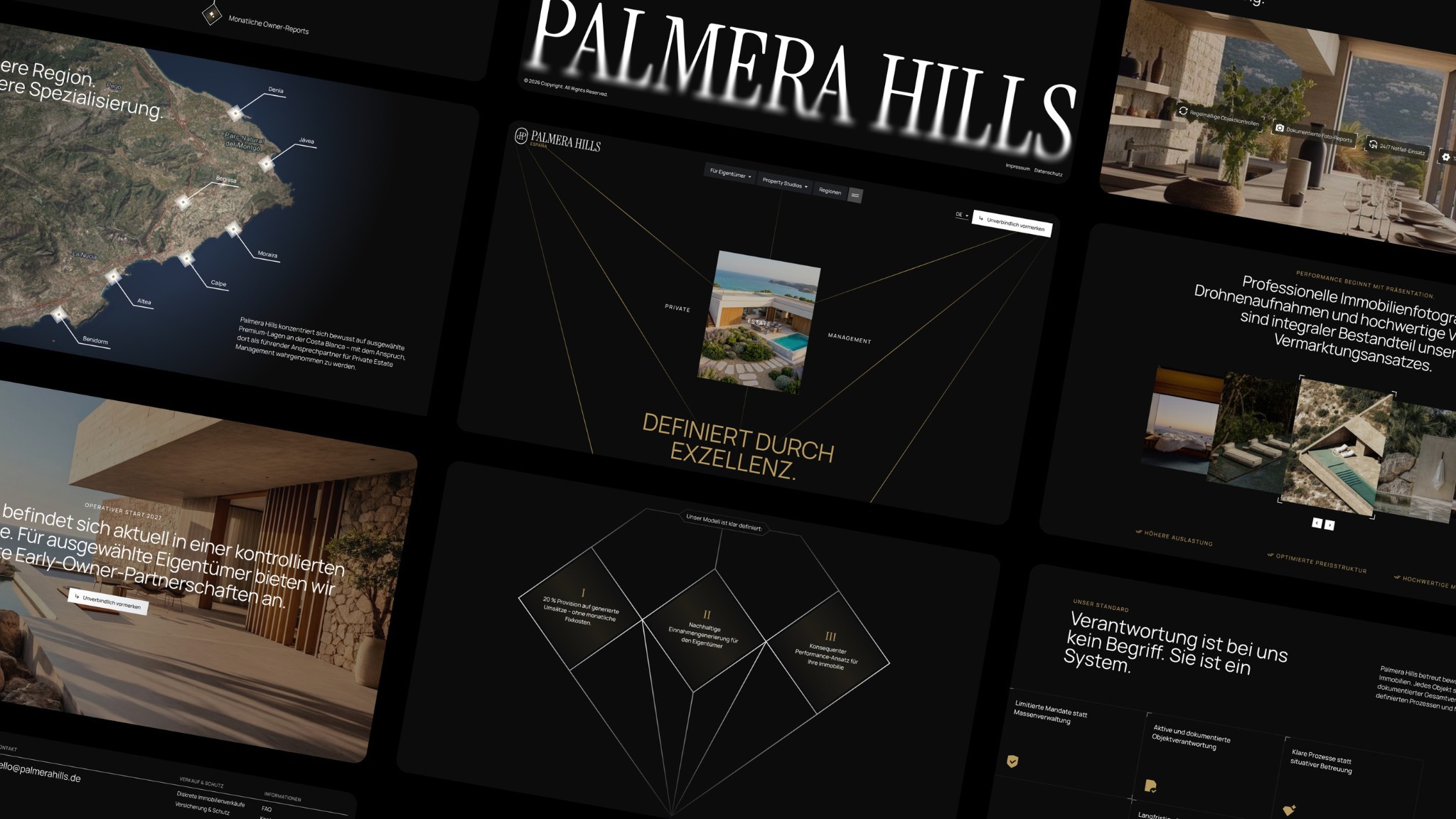
Two real estate projects are on the website as references. For Palmera Hills, a provider of private estate management, we created the corporate identity and website in Webflow in 2026. According to the project page, the site addresses international owners, investors and partners: nine services and seven regions have their own pages, a mega menu organizes the offering into three groups, and the contact page offers three ways to inquire. Instead of heavy animation libraries, it uses custom, lightweight scroll animations, and Google PageSpeed Insights shows up to 100 points. For Atoria Immobilien, we created a corporate identity in 2026 with an architecturally shaped visual language meant to convey stability, trust and a premium positioning (Atoria Immobilien project). We discuss how 3D can make sense for your project in the initial conversation, before any effort is spent.

Frequently asked questions
Is a project website with 3D visualizations worth it for a new-build project compared to brochure PDFs?
Yes, if the project is marketed before or during construction, the renderings are being created anyway, and someone maintains the site. The website connects images, availability and inquiry. The PDF stays useful as a download. For existing properties without renovation, photos are enough.
How should owners and property seekers be separated on a broker website?
With two clear entry points on the homepage, separate areas in the navigation, their own forms and their own CRM channels. Cross-references make sure nobody ends up in a dead end.
Do visualizations have to be labeled?
They should be recognizable as visualizations, with a note on possible deviations. In a developer contract, what is in the notarized contract is binding. Have your legal counsel review texts and images.
Do 3D elements slow down the website?
They can, if they are loaded in the first view or are too large. Google gives LCP up to 2.5 seconds, INP up to 200 milliseconds and CLS up to 0.1 as targets. With a static first image, lazy-loaded media and a lean mobile version, the page stays fast.
What does a 3D visualization for marketing cost?
It varies widely. A visualization provider gives a three- to four-digit euro range per image for single photorealistic images, and animations and walkthroughs cost more. A motion provider gives €8,000 to €15,000 for websites with motion and €15,000 to €30,000 for premium websites. Both are individual statements, not market averages.
Which agencies design user paths for real estate companies?
Look for references with several target groups, for a process that clarifies the audiences before the design, and for an agency that shows the separation in navigation, forms and measurement, not just in the layout.
Is real-time 3D in the browser necessary?
Mostly not. A pre-rendered sequence or a video delivers render quality without the browser having to compute anything. Real-time 3D pays off when visitors need to rotate or explore an object freely.
Conclusion
A project website with 3D does not replace the PDF, it turns the same renderings into an inquiry path. It pays off when marketing starts off plan, when there are several target groups, and when someone maintains it. Keep an eye on load time, label visualizations, and separate owners and property seekers from the homepage all the way into the CRM.
If you are looking for support with motion and 3D, you will find it on the Motion Design page.
Sources
- Maverickframe: 3D-Visualisierung im Immobilienmarketing (3D visualization in real estate marketing)
- in-sync: Motion Design Agentur (motion design agency)
- web.dev: Web Vitals
- VPB: Ratgeber Neues Bauvertragsrecht, Baubeschreibung (guide to the new construction contract law, building specification)
- Lexetius: § 650j BGB Baubeschreibung (§ 650j BGB, building specification)
- Gesetze im Internet: § 87 GEG, Pflichtangaben in Immobilienanzeigen (§ 87 GEG, mandatory information in real estate listings)
- ImmoScout24 und Propstack: Umfrage unter 350 Maklern (09.09.2025) (survey of 350 brokers, September 9, 2025)
- Görg: Digital ohne Hürden, was das BFSG für Unternehmen bedeutet (20.01.2025) (Digital without barriers, what the BFSG means for companies, January 20, 2025)
- Webwavers: Process
- Webwavers: Project Palmera Hills
- Webwavers: Project Atoria Immobilien
More guides
All guides
PHP2Shell: Is your TYPO3 or WordPress website affected? What you need to do now
Oct 21, 2026
Read more



Branding Agency, Freelancer or In-House: What Pays Off for Mid-Sized Companies?
Oct 31, 2026
Read more


GEO for B2B Industries: How Expert Content Gets Cited in ChatGPT and Perplexity
Oct 31, 2026
Read more


Wix, Squarespace, Jimdo or Webflow: Which Platform Can Carry a Company Website?
Oct 31, 2026
Read more








